This chapter covers the rule features that go beyond the plain structural rules of the previous chapter: wildcards, regular expressions, rule parameters, universally quantified (nested) rules, type graphs, and the grammar-wide system properties. Data attributes and expressions have a chapter of their own, Using data.
Wildcards and label variables
Wildcards are special labels that can be used in rules to stand for arbitrary labels. The basic wildcard is a question mark ?: it is matched by any edge whose source and target node also match. Because wildcards are part of the regular-expression syntax (see below), they are written within curly braces in the edit view: {?}. Wildcards can be used on reader, embargo and eraser edges; named wildcards can also be used on creators, see below.
-
Type and flag wildcards. The plain wildcard
?only captures edges. Node types and flags can also be matched, by using{type:?}or{flag:?}instead. -
Guarded wildcards. A wildcard can be constrained by a list of allowed or forbidden labels:
{?[a,b,c]}is only matched by the labelsa,borc(like the regular expression{a|b|c}, but usable on eraser and — when named — creator edges), whereas{?[^a,b,c]}is matched by any label excepta,borc. The labels in the guard are edge labels, node types or flags, depending on the kind of wildcard. -
Named wildcards. A wildcard can be given a name, directly following the question mark:
{?x}is a wildcard namedx, acting as a label variable. When the wildcard is matched, the matching label becomes the value of the variable for the duration of the rule application. The same variable may occur multiple times in a rule; all occurrences must then be matched by the same label. Names can be combined with guards, as in{?x[^a,b,c]}.
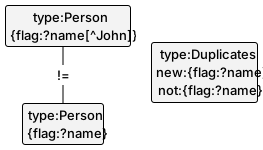
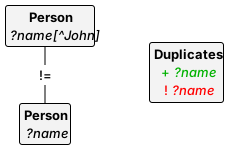
A named wildcard may be used on a creator edge, provided a binding occurrence exists in the LHS; this enables the copying of edge labels, types or flags. For instance, the following rule specifies that if the same flag occurs on two distinct Persons, and this flag is not John, it is added to a collector node of type Duplicates, provided it is not already there:
| Edit view | Display view |
|---|---|
 |
 |
When type graphs are used, wildcards may not occur on creator edges.
Among the samples, wildcards demonstrates these features.
Regular expressions
Rule edges can carry regular expressions over graph labels. Such an expression is matched by any path in the host graph whose consecutive edge labels form a word recognised by the expression. Regular expressions may only be used on reader and embargo edges, never on erasers or creators (except for the case of named wildcards discussed above).
Regular expressions are distinguished by surrounding curly braces: {a.b} is a regular expression, matched by two consecutive edges labelled a and b, whereas a.b is a single label containing a dot. The available operators:
| Expression | Meaning |
|---|---|
| label | Simple label, matched literally |
= |
Empty path: matched by coinciding nodes |
? |
Wildcard, possibly named and/or guarded (see above) |
R1.R2 |
Sequential composition: a match of R1 followed by a match of R2 |
R1|R2 |
Choice: a match of either R1 or R2 |
R* |
Zero or more repetitions of R |
R+ |
One or more repetitions of R |
-R |
Inversion: a match of R traversed backwards, against the edge directions |
!R |
Negation: the absence of a match of R (only in front of the entire expression) |
Some points worth noting:
- Atoms follow the label syntax rules of the previous chapter: labels with special characters must be single-quoted.
- The equality sign as an atom stands for the empty word; for instance,
{a|=}expresses that there is ana-edge between two nodes or the nodes coincide.R*is equivalent toR+|=. - A negation is not properly part of the regular expression: it expresses the absence of a match, and can therefore only occur up front, not nested inside an expression. This is the same negation introduced in the previous chapter.
- A named wildcard inside a regular expression can only be used if the name is bound by another occurrence outside a regular expression.
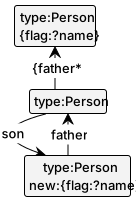
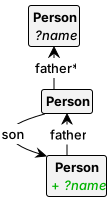
For instance, the following rule specifies that a son receives the name of one of his forefathers:
| Edit view | Display view |
|---|---|
 |
 |
Rule parameters
Rule parameters make information about a match visible in the transition system, and allow values to be passed between rules and control programs. A parameter is declared by a prefix on an LHS node (on the implicit top existential level, see Nested rules):
par:ndeclares a bidirectional parameter with numbern: in a control program it may be instantiated with a concrete value, or used as an output parameter, in which case the value is determined by the match.parin:ndeclares an input parameter: its value must be provided by a control program.parout:ndeclares an output parameter.ask:ndeclares an interactive parameter: its value is provided upon application through a value oracle, configured in thevalueOraclesystem property.
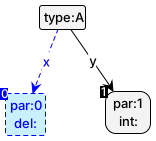
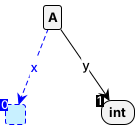
Parameter numbers start at 0 and must be unique and contiguous within a rule. The following shows a parameterised rule and a potential start graph:
| Edit view | Display view | Start graph |
|---|---|---|
 |
 |
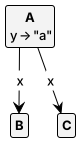 |
If the transitionParameters system property is set, transition labels are extended with the list of parameter values. For ordinary nodes, the value is the node identity, denoted nid with id the internal node number; for value nodes, it is the data value itself. Applying the rule above to the start graph shown yields two transitions, labelled parameters(n1,"a") and parameters(n2,"a") (with the actual node numbers depending on the graph). Beware that node identities are not guaranteed to be preserved between graphs: only within the transitions leaving one and the same state do equal node identities refer to the same node.
Anchor nodes
Declaring a parameter has a second effect: matches that map the parameter node to different host graph nodes always count as distinct rule applications, even if the rule’s effect is the same. This matters especially for unmodifying rules, which normally give rise to at most one application per state.
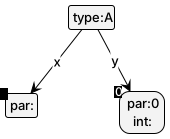
If distinct applications are wanted without showing a node identity in the label, a node can be marked as an anchor using the bare prefix par: (without number). For instance, the following rule, applied to the start graph above, gives rise to two distinct transitions, both labelled anonymousParameter("a") — self-loops, since the rule does not change the graph:
| Edit view | Display view |
|---|---|
 |
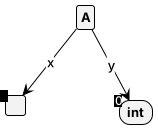 |
Note that the display view does not show the anchor at all.
Among the samples, parameters demonstrates these features.
Nested rules
Nested rules make changes to all subgraphs matching a pattern at once, rather than to a single existentially matched image. The concept has its roots in predicate logic: a rule can have a tree of quantifier levels, alternating between universal and existential.
Nesting levels
Quantification is specified by auxiliary quantifier nodes:
forall:— a universal level: the sub-rule at this level is applied to every match (possibly none);forallx:— a non-vacuous universal level: likeforall:, but there must be at least one match;exists:— an existential level: the sub-rule is matched exactly once;existsx:— an optional existential level: the sub-rule is matched if possible, and transformed only where matched.
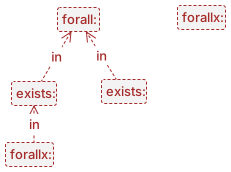
Quantifier nodes are connected by in-labelled edges expressing that one level is nested inside another. The quantifiers must form a forest under in; universal and existential levels alternate, with universal levels at the roots. There is always an implicit top-level existential node above the roots. The following shows a possible nesting structure (leaving out the actual rule):
| Edit view | Display view |
|---|---|
 |
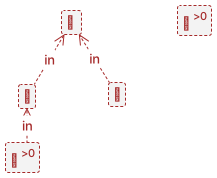 |
which roughly reflects the quantifier structure ∃(∀(∃∀⁺ ∨ ∃) ∧ ∀⁺).
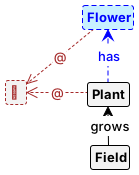
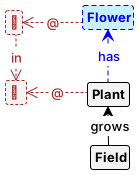
The rule elements belonging to a level are connected to the quantifier node by at-labelled edges (displayed as @): every node of the sub-rule has an at-edge to its quantifier. For example, rule (a) below removes all Flowers of all Plants of a (single, implicitly existentially matched) Field; rule (b) picks exactly one Flower of every Plant that has at least one; and rule (c) is like (b) but additionally requires at least one Plant with a Flower to be present (where (b) would still match, vacuously, without changing anything):
| (a) | (b) | (c) |
|---|---|---|
 |
 |
 |
A rule may have several independent universal levels. The following fires a transition of a Place-Transition net: one universal level removes a token from every input place, another adds a token to every output place:

The copy_graph grammar among the samples shows further uses of nested rules.
Named nesting levels
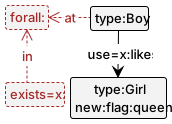
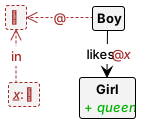
Associating rule elements with a level through at-edges fails for edges between nodes of a higher level: an edge cannot itself carry an at-edge. The classic example: “a girl that all boys like becomes queen”, i.e.
∃x: Girl(x) ∧ (∀y: Boy(y) ⇒ likes(y,x))
Here the likes-edge belongs on an (implicit) existential level below the universal one, but both its end nodes are on higher levels. Placing it naively puts it on the universal level itself, which changes the meaning to “every boy that likes the girl” — trivially satisfied.
The solution is to name the nesting level: the quantifier prefix takes the name as a parameter, exists=x: (or forall=x:), and the edge declares the level name in its role prefix — use=x:likes for a reader, and analogously del=x:, new=x:, not=x:. The correct crowning rule:
| Edit view | Display view |
|---|---|
 |
 |
Counting
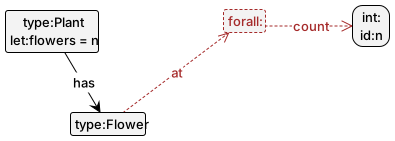
A universal quantifier can count its matches: a count-labelled edge from the quantifier node to an (integer) value node binds that node to the number of matches. The value can then be used in expressions, or matched against a concrete value. For instance, the following rule stores the number of Flowers of a Plant in its flowers attribute:
| Edit view | Display view |
|---|---|
 |
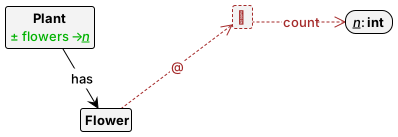 |
This subsumes the counting idiom with injectivity constraints shown in the previous chapter: matching the count-edge of a forall: against a constant int:3 node requires exactly three matches.
Type graphs
Rules and graphs can be typed or untyped. In the untyped case, any combination of labels is allowed: nodes can have zero or more node types, and rules can add or remove types at will. A type graph constrains the allowed structure — node types, flags and edge labels alike — and brings additional features: subtyping, abstract types, multiplicities, composite edges, colours and nodified edges.
A grammar is typed if it has at least one enabled type graph; multiple enabled type graphs are automatically merged. In the presence of a type graph, GROOVE flags as errors:
- every node without a type or with more than one type, as well as all node type erasers and creators;
- every node type, flag or edge label that does not occur in the type graph (for flags and edges: on the corresponding node type or a supertype);
- mergers between nodes of different types, unless one type is a subtype of the other;
- multiplicity violations and composition cycles (as configured by the
typePolicysystem property).
Subtyping
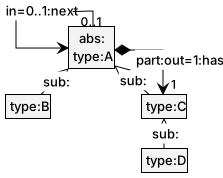
Subtype relations are declared in the type graph by sub:-labelled edges, displayed as unlabelled edges with an open triangular arrow head. The subtype edges must form a partial order (no cycles). A rule node of type A is then matched by nodes of type A or any subtype. For instance, given the type graph
| Edit view | Display view |
|---|---|
 |
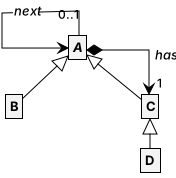 |
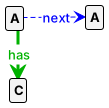
with D < C < A and B < A, the following rule has two matches in the graph beside it — the A-nodes of the rule can be matched by any node, whereas the C-node only matches the D-node:
| Rule | Graph |
|---|---|
 |
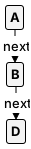 |
To require a node to be matched by an exact type rather than a subtype, embargo nodes with the forbidden subtypes can be used:
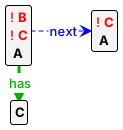
Further type graph features
-
Abstract types. A node type marked
abs:cannot occur in host graphs; it exists only to be subtyped, and rule nodes of an abstract type match its concrete subtypes. Flags and edges declared on anabs:-marked element are likewise abstract. -
Multiplicities. Type graph edges can carry multiplicity declarations:
out=n..m:labelon a node type constrains every node of that type to have betweennandmoutgoinglabel-edges;in=n..m:labeldoes the same for incoming edges. The lower bound is optional and the upper bound may be*(unbounded), so e.g.out=1:labeldemands exactly one andin=0..*:labelis unconstrained. Violations are handled according to thetypePolicysystem property. -
Composite edges. An edge marked
part:in the type graph declares containment (in the sense of UML composition): every node is the target of at most one composite edge, and composite edges may not form cycles. This, too, is checked dynamically per thetypePolicyproperty. -
Imported types. A node type marked
import:is used but not defined in this type graph; it must be declared in another enabled type graph. This supports splitting large type graphs into modules. -
Colours. A
color:label (with a colour name or comma-separated RGB values, e.g.color:redorcolor:200,0,100) on a type node colours all nodes of that type, and their outgoing edges, in the display. The same aspect can be used directly on host graph and rule nodes; in a rule, the colour is applied to the matched nodes upon rule application. -
Nodified edges. A node type can be declared a nodified edge by a label of the form
edge:"format",field,...: nodes of this type are not displayed as nodes at all; instead, their incoming edges are labelled by the format string, instantiated with the given attribute fields (String.formatsyntax). This is useful to visualise, for instance, labelled connections with attributes as plain-looking edges.
Node identifiers (id:name) are also worth mentioning here: apart from their role in expressions, when multiple start graphs are enabled (see the startGraph system property), nodes with the same identifier are merged, which makes identifiers the glue for composing start graphs from parts.
System properties
Besides its rules, graphs and control programs, a grammar has global system properties, editable in the Simulator’s Properties display or directly in the system.properties file of the .gps directory. The current properties:
| Property | Default | Meaning |
|---|---|---|
remark |
(empty) | One-line documentation of the grammar |
algebraFamily |
default |
Algebra used for attributes: default, point, big or term (see Using data) |
valueOracle |
(none) | Source of values for unbound ask: parameters |
userOperations |
(empty) | List of classes whose @UserType records and @UserOperation methods become data types and operations (since release 6.7.0; see Using data) |
userClassPath |
(empty) | List of directories and jars, relative to the grammar directory, from which the userOperations classes are loaded (since release 7.6.0; see Using data) |
matchInjective |
false |
Enforces injective matching for all rules (overrides the rule property) |
parallelEdges |
false |
Allows parallel edges in host graphs (multigraphs instead of simple graphs) |
checkDangling |
false |
Forbids matches that would leave dangling edges (DPO-style deletion) |
checkCreatorEdges |
false |
Treats creator edges as implicit NACs |
rhsIsNAC |
false |
Treats each entire RHS as an implicit NAC |
checkIsomorphism |
true |
Collapses states up to isomorphism |
startGraph |
start |
List of active start graph names |
controlProgram |
(empty) | List of enabled control programs |
typeGraph |
(empty) | List of active type graphs |
prolog |
(empty) | List of active Prolog programs |
ruleEnabling |
(empty) | Force-enables (+) or -disables (-) rules, overriding the enabled rule property (since release 7.4.0) |
actionPolicy |
(empty) | Per-action policy (off, silent, error, remove) for forbidden/invariant properties |
typePolicy |
error |
Handling of dynamic type constraint violations: off, error or remove |
deadlockPolicy |
off |
Handling of deadlocked states: off or error |
exploration |
(empty) | Default exploration configuration for this grammar (since release 7.6.0; up to release 7.5.3: explorationStrategy) |
storeOutParameters |
false |
Stores output parameters for implicit group calls in transition arguments |
controlLabels |
(empty) | List of rare labels, used to optimise matching |
commonLabels |
(empty) | List of frequent labels, used to optimise matching |
transitionParameters |
some |
Shows rule arguments in transition labels: false, some or true |
loopsAsLabels |
true |
Displays binary self-edges as node labels |
useStoredNodeIDs |
false |
Bases node numbers on the node identities stored in the graph files (since release 6.6.3) |
ecoreOrdering |
none |
Encoding of ordered many-valued features on Ecore import/export (none or index) (since release 8.0.0, forthcoming) |
ecoreUseIdentifiers |
false |
Uses xmi:id values as node identifiers on Ecore import (since release 8.0.0, forthcoming) |
(The properties grooveVersion, grammarVersion and location are maintained automatically and not user-editable.)
Some of these deserve a fuller explanation:
-
Match injectivity. Matches are in general non-injective (see the previous chapter). Setting
matchInjectiveenforces injectivity for all rules at once; in this way, GROOVE can simulate rule systems designed for tools that always impose injectivity. -
Dangling edge check. When GROOVE deletes a node, all incident edges are deleted with it, whether or not the rule mentions them — the SPO (single-pushout) approach. In the DPO (double-pushout) approach, a rule is inapplicable if a deleted node has an incident edge not explicitly deleted as well. Setting
checkDanglingmimics this behaviour. -
Creator edge check. Edges have no identity of their own in simple graphs: adding an edge that is already present leaves the graph unchanged. Setting
checkCreatorEdgesadds an implicit embargo for every creator edge, making the rule inapplicable in that situation instead. -
Parallel edges. Alternatively, setting
parallelEdgesmakes host graphs multigraphs, in which several edges with the same label may connect the same pair of nodes. -
Treating RHSs as NACs. In applications where graphs are only ever extended — notably model transformation — a rule should typically be applied only once per match, which without deletion can only be prevented by a NAC. Setting
rhsIsNACadds the RHS as an implicit NAC to every rule. -
Isomorphism check. Collapsing states up to isomorphism is one of GROOVE’s strong points, but the check is expensive. For problems known to have little or no symmetry, setting
checkIsomorphismtofalsegains efficiency (states are then compared up to equality). -
Control and common labels.
controlLabelslists labels that occur rarely in the host graphs: matching starts there, which can speed it up considerably.commonLabelslists labels that occur frequently; these are matched last.
The policy properties (actionPolicy, typePolicy, deadlockPolicy) determine how violations of graph properties — forbidden patterns, invariants, type constraints, deadlocks — are treated during exploration: ignored (off), flagged on the state (silent), reported as errors (error), or excised from the state space (remove). They connect to the actionRole rule property discussed in the previous chapter.