Edit view and display view
GROOVE shows graphs and rules using various kinds of graphical embellishments: colours, bold and italic fonts, dashed and dotted outlines, and special symbols. When editing, however, you do not manipulate those embellishments directly; instead, the node and edge labels you enter use a textual syntax that makes the same distinctions. The prime element in this syntax is a prefix: an identifier followed by a colon (:).
Throughout this chapter, figures therefore come in pairs: the edit view on the left, showing the labels as you type them, and the display view on the right, showing how the Simulator renders the same graph or rule. The prefixes used in this chapter are:
| Prefix | Used in | Meaning |
|---|---|---|
type: |
graphs, rules | node type label |
flag: |
graphs, rules | flag (boolean property) label |
use: |
rules | reader element (optional, the default) |
del: |
rules | eraser element |
new: |
rules | creator element |
not: |
rules | embargo element |
cnew: |
rules | conditional creator element |
rem: |
graphs, rules | remark (comment) |
: |
graphs, rules | initial colon: the rest of the label is taken literally |
This is not the complete list; further prefixes are introduced in the Advanced rule features chapter, and the generated aspect prefixes reference gives the full overview. The same information is available in the Simulator itself: the right-hand panel of the graph editor lists every prefix with a usage explanation.
Graphs
GROOVE is based on directed graphs with labelled nodes and edges. Nodes are depicted as boxes and edges as arrows between them; node labels are inscribed in the nodes, edge labels placed along the arrows.
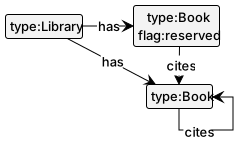
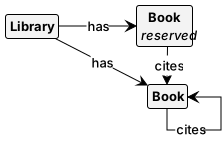
There are two kinds of node labels: types and flags. In the edit view, these are distinguished from one another (and from edge labels) by the prefixes type: and flag:, respectively. In the display view, types are set in bold and flags in italic. If you enter a label without a prefix, GROOVE interprets it as an edge label and creates a self-edge with that label; in fact, self-edges are also displayed inscribed in the node, so for untyped graphs the visual effect is much the same. Here is an example:
| Edit view | Display view |
|---|---|
 |
 |
The distinction between types and flags matters in two ways:
- Type labels are partially ordered by subtyping (inheritance), if a type graph is used. This affects rule matching: a type label in a rule also matches all its subtypes in the host graph. See Advanced rule features.
- In the presence of a type graph, every node must have exactly one type label.
Graph label syntax
Type labels and flags must be identifiers: strings starting with a letter or underscore and containing only letters, digits, underscores and dollar signs. The same is recommended (though not enforced) for edge labels. To use an arbitrary label, start it (in the edit view) with a colon: everything after the initial colon is taken literally, and the colon itself is not part of the label. Whitespace other than simple spaces, such as tabs and newlines, cannot be part of a label.
Rules
Formally, a graph transformation rule consists of a left hand side (LHS), a right hand side (RHS) and optional negative application conditions (NACs), each of which is a separate graph, connected by morphisms. In GROOVE, all of these are combined into a single graph, and colour coding distinguishes the original components. A GROOVE rule thus has the following kinds of elements:
-
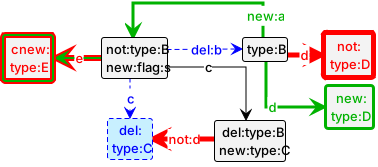
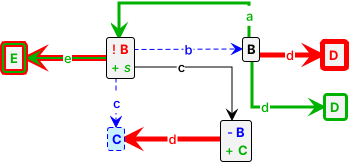
Readers are in both the LHS and the RHS: they must be present for the rule to apply, and are unaffected by it. They are depicted like ordinary graph elements: thin black outlines, black text. In the edit view, an edge can optionally be marked as a reader with the prefix
use:, but this is the default and normally omitted. -
Erasers are in the LHS but not the RHS: they must be matched for the rule to apply, and are deleted by its application. They are depicted with thin, dashed blue outlines and blue text; an erased type or flag on a node that is itself preserved is prefixed with
−in the display view. In the edit view, erasers carry the prefixdel:— on its own as a node label for eraser nodes, or in front of the edge label for eraser edges. -
Creators are in the RHS but not the LHS: they are created when the rule is applied. They are depicted with a slightly wider, solid green outline and green text; a created type or flag on an existing node is prefixed with
+in the display view. In the edit view, creators carry the prefixnew:, used in the same way asdel:. -
Embargoes are in a NAC but not in the LHS: they are forbidden, meaning their presence in the host graph prevents the rule from applying. They are depicted with a wide, dashed red outline and red text; a forbidden type or flag on a matched node is prefixed with
!in the display view. In the edit view, embargoes carry the prefixnot:, used in the same way asdel:. -
Conditional creators are in the RHS and in a NAC, but not in the LHS: the element must be absent for the rule to apply, and is created by it — the combined effect of a creator and an embargo. They are depicted with a spiked green-and-red outline and green text. In the edit view, they carry the prefix
cnew:, used in the same way asdel:.
If a node is an eraser, creator, conditional creator or embargo, its incident edges implicitly have the same role, so for those edges the prefix may be omitted.
The following example rule contains all of the element kinds listed above:
| Edit view | Display view |
|---|---|
 |
 |
Note that, among other things, this rule deletes and creates type labels; this is forbidden in the presence of a type graph (see Advanced rule features).
Rule label syntax
Label parsing in rules is more complicated than in host graphs, because rule labels may contain regular expressions and other operators (introduced here and in the next chapter). The following points should be noted:
- The initial-colon convention is the same as for graphs: to use a label containing special characters literally, precede the entire label with a single initial colon, which is itself not part of the label.
- Alternatively, a label containing characters that would otherwise have a special meaning — such as
'(single quote),\(backslash),?,!,=,{or}— can be surrounded by single quotes; the quotes are not part of the label. In general, a label consisting only of letters, digits and the characters_,$and-needs no quoting. - Within a single-quoted label, the backslash acts as an escape character: the next character (including a single quote or another backslash) is interpreted literally.
For instance, the rule label '\\?\'' (ending in two single quotes) matches the label \?' in a host graph.
Rule names
Rules have names, which are essentially identifiers: it is recommended to start a rule name with a (lower-case) letter and to restrict the remaining characters to letters, digits, underscores and dollar signs. Rule names can be qualified, imposing a hierarchical structure similar to Java package names: a.b stands for rule b in package a, and the rule tree in the Simulator displays the packages as folders. This structure is purely organisational — it does not change the meaning of the rule system.
Example usage
Among the samples distributed with GROOVE, the following demonstrate the features above: circular-buffer, a simple data structure with two rules containing creators, erasers and embargoes; and loose-nodes, showing that node labels are just self-edges which can be added to existing, unlabelled nodes.
Negations
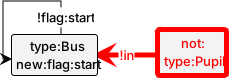
Another way to forbid an edge, type or flag is by inserting an exclamation mark (!) in front of its label. For an edge, this has the same effect as the not: prefix; but unlike the prefix, a negation can also be used within an embargo, achieving a double negation. For instance, the following rule can only match if the Bus has not already started (the !flag:start self-edge) and there is no Pupil that is not in the bus — in other words, if all pupils are in the bus. When it matches, the rule starts the bus.
| Edit view | Display view |
|---|---|
 |
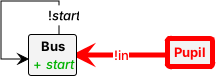 |
Note that in the display view, all negations are displayed as binary edges (including the negated flag) and typeset in italic. This is because they are actually special cases of regular expression edges; see Advanced rule features.
Negations may only be used on reader and embargo edges; they would be meaningless on eraser or creator edges.
Equalities, mergers and injectivities
GROOVE has a special edge label = (the equals sign). Used between two nodes in a rule, it expresses that the nodes are really the same, despite being depicted separately. Equality labels may also be used on creator edges (which are then called mergers) and on embargo edges (then called injectivities), and they may be combined with negation.
Mergers
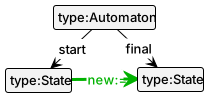
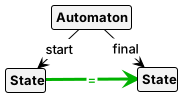
A rule can merge nodes: this is specified by an edge labelled new:= between the nodes to be merged. The direction of the edge is irrelevant — in the display view, the arrow head is omitted. The merged node receives the incident edges of both original nodes, including types and flags. For instance, the following rule merges the start and final state of an automaton, while all incoming and outgoing transitions are preserved:
| Edit view | Display view |
|---|---|
 |
 |
Injectivities
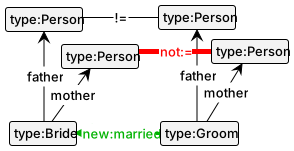
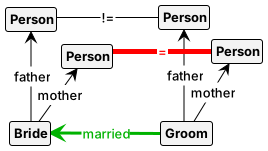
In general, rules are not matched injectively: distinct LHS nodes may be matched by the same host graph node. (Injectivity can also be imposed per rule or for the whole grammar through the rule and system properties; see Rule properties below.) Local injectivity is enforced by an edge labelled != (or equivalently not:=): the end nodes of such an edge always have distinct images. As for mergers, the direction of the edge is irrelevant. For instance, the following rule specifies that a couple may only marry if they do not share a parent:
| Edit view | Display view |
|---|---|
 |
 |
Counting
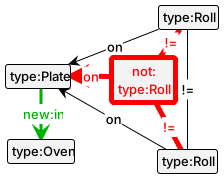
Just as for ordinary labels, the negated label != on a reader edge has in principle the same effect as the embargo label not:= — but negations can be used within embargoes. This enables a form of counting. For instance, the following rule specifies that a Plate may only be put in the Oven if it holds exactly two Rolls — no more and no less:
| Edit view | Display view |
|---|---|
 |
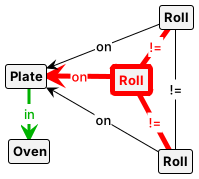 |
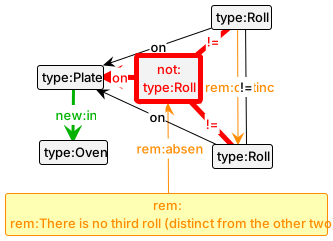
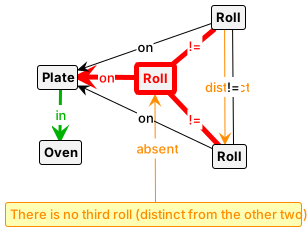
The injectivity between the two reader Rolls ensures that there are at least two of them, whereas the embargo Roll, with its injectivities to both readers, ensures that there is no third. (A more sophisticated method of counting, using quantifiers, is described in Advanced rule features.)
Example usage
Among the samples, mergers shows the use of mergers, and counting demonstrates the counting principle above.
Remarks
To document rules and graphs, GROOVE offers special nodes and edges that make no difference to the transformation: remarks, entered with the prefix rem: — either standing alone as a node label or in front of an edge label, just like the role prefixes. In the display view, remark nodes and edges are orange with a yellow background. For instance, this is the counting rule from above, augmented with remarks:
| Edit view | Display view |
|---|---|
 |
 |
Rule properties
Apart from its graph structure, a rule also has rule properties, which can be inspected and modified in the Properties tab of the Simulator’s rule display. The current properties are:
| Property | Default | Meaning |
|---|---|---|
priority |
0 |
Priority with which the rule is scheduled |
enabled |
true |
If false, the rule is never evaluated |
injective |
false |
Enforces injective matching of this rule |
actionRole |
(derived) | Role of the rule: transformer, condition, invariant or forbidden |
matchFilter |
(empty) | Boolean method or predicate filtering the matches of the rule |
remark |
(empty) | One-line documentation of the rule, shown e.g. as tool tip |
printFormat |
(empty) | Text printed on standard output upon each rule application |
transitionLabel |
(empty) | Label shown in the LTS instead of the rule name |
Some of these deserve further explanation:
-
Priorities provide a basic way to schedule rules: as long as a rule of higher priority is applicable, no lower-priority rule can be applied. Assigning different priorities also changes the rule tree in the Simulator, which then shows the rules grouped by priority. A typical use is a high-priority rule that merely tests for the presence of an
Errornode: it automatically halts the exploration of any branch in which another rule has introduced such a node. Theprioritiessample shows an example. -
Enabledness. A disabled rule is never scheduled for application. This is useful while developing a grammar, as it makes it easy to experiment with different versions of the same rule.
-
Action role. By default, a rule that modifies the graph (or has parameters) is a
transformer, and a parameterless, unmodifying rule is acondition, checked at every state. The rolesinvariantandforbiddenturn the rule into a graph property whose violation is handled as dictated by the corresponding grammar policy. -
Formatted output. The
printFormattext is written to standard output on every application of the rule; it may containString.format-style format specifiers, which are instantiated with the rule parameters. -
Transition labels. By default, transitions in the generated transition system are labelled with the name of the applied rule. A nonempty
transitionLabelis used instead of the rule name — for instance to make different rules give rise to equally labelled transitions. LikeprintFormat, it may refer to rule parameters using aString.format-like syntax.
Rule systems, grammars and transition systems
A rule system is a set of rules, possibly with additional resources such as a control program (see Control language) and system properties. A grammar is a rule system together with a start graph. The default start graph is called start; other start graphs can be selected in the Simulator or specified on the command line.
During exploration, GROOVE builds up a transition system, in which every reached graph is a state and every rule application a transition. By default, transitions are labelled by the names of the applied rules — but see the transitionLabel rule property above. Whether the labels also show rule arguments is controlled by the transitionParameters system property. Exploration and the analysis of the resulting transition system are the subject of the Exploration and verification chapter.
Note that the hierarchical structure of qualified rule names plays no role in the evaluation of a grammar: its meaning does not change if rules are renamed, even across packages. (If a rule is renamed, however, any control program referring to it needs to be adjusted as well.)