GROOVE supports data values — integers, reals, booleans and strings — in the form of attributes: named fields of graph nodes, formally represented as edges to special value nodes. The four built-in data sorts are int, real, bool and string. A fifth sort, user, holds values of user-defined types: Java records that you make available to GROOVE, together with your own operations on them. These are the subject of the second half of this chapter; the first half covers the built-in data support.
Attributes in host graphs
In a host graph, an attribute can be specified in either of two ways:
- By an ordinary edge to a constant node: a node labelled
int:0,real:100.0,bool:trueorstring:"John"(note the double quotes) stands for the corresponding data value. The edge label is the field name. - By an assignment
let:field = conston the node itself.
In the display view, attributes are not shown as separate nodes and edges, but in the familiar record-like notation, as field = value equations inside the node. (The Simulator has an option to switch this off and show value nodes as ellipses.) The following shows an attributed host graph:
| Edit view | Display view |
|---|---|
 |
 |
Tests and assignments in rules
Within rules, attributes are matched, tested and modified using expressions:
-
test:followed by a boolean expression makes the rule applicable only if the expression holds. Field names in the expression refer to attributes of the node the test is on (optionally writtenself.field); fields of other nodes can be referenced by declaring a node identifierid:nameon the other node and writingname.field. -
let:followed by an assignmentfield = exprsets the value of the field upon rule application, replacing any previous value. The expression is evaluated over the values before application. -
Variable nodes are value nodes with unknown value: a node labelled just with a sort, such as
int:orreal:, matches any value of that sort. With anid:xlabel, the value is available in expressions asx. Variable nodes are connected by ordinary attribute edges, and can be used to bind, compare or consume values.
Value nodes can never be created or deleted — every value exists exactly once, at least conceptually — so they only ever occur as readers; attribute edges however can be erased and created like any other edge.
The following rule expresses a bank withdrawal: the requested amount-edge from the ATM to the value x is consumed, and the Account’s balance is reduced by x, provided the balance is sufficient:
| Edit view | Display view |
|---|---|
 |
 |
Note the display notation: the test is shown as a plain condition (balance >= x) and the assignment as a value change (± balance → balance - x).
Expression syntax
Expressions use conventional infix syntax:
| Sort | Operators |
|---|---|
int, real |
+ - * / (and % for int), unary -; comparisons < <= > >= == != |
bool |
! (not), & (and), | (or), == != |
string |
+ (concatenation), lexicographic < <= > >=, == != |
Beyond the operator symbols, named operations are called in functional style, e.g. max(x,y), abs(x), length(s), substring(s,i,j), ite(b,x,y) (if-then-else), and conversions such as toInt(s) or casts (real) x (the (real) and (string) casts since release 6.3.0). The complete list of operations per sort is given in the generated data operations reference, and in the editor’s syntax help panel. User-defined operations (see below) are called in the same functional style.
An operation whose arguments are not valid for it — division by zero, say, or a substring index out of range — yields an error value of its result sort (since release 6.7.0): NaI for int, NaR for real, NaB for bool, NaS for string and NaU for user. Error values are values like any other: they are shown as such in the state, and a rule can test for them.
The underlying product-node notation
Expressions are in fact a convenient front-end for a lower-level graph notation that remains available: product nodes (labelled prod:) stand for tuples of values, with arg:0, arg:1, … edges to their argument value nodes and operator edges (such as real:sub or real:ge) to result value nodes. The following is the same withdrawal rule in this notation:
| Edit view | Display view |
|---|---|
 |
 |
The expression syntax is strongly preferred for readability; the product-node notation is chiefly of interest because the display view of complex expressions decomposes into it, and for grammars dating from before the expression syntax existed.
Algebras
Formally, the data sorts and operations form a signature, which is interpreted by an algebra defining the actual values and functions. Through the algebraFamily system property (see Advanced rule features), the interpretation can be changed. Supported values:
default: Java-based values (int,double,boolean,String);point: a single value for every sort — all constants and operations collapse to that value (useful for abstraction);big: high-precision values — arbitrary-precision integers and 34-digit decimal reals (BigInteger/BigDecimal);term: symbolic term representations rather than computed values.
In the default algebra, comparison of reals has a tolerance of 10⁻⁷: values whose relative difference is below the tolerance are considered equal, to avoid artificial differences due to rounding errors. In the big algebra, the tolerance is 10⁻³⁰.
The user sort is only implemented in the default algebra: a grammar that uses user-defined types or operations must leave the algebraFamily property at its default value.
Among the samples, attributed-graphs demonstrates the use of attributes.
User-defined types and operations
The built-in sorts and operations are deliberately minimal, which leaves three things awkward or impossible to model:
- Computations beyond the built-in operations. Trigonometry, statistics, elaborate string processing: anything not in the data operations reference has to be encoded in rules and graph structure, if it can be encoded at all.
- Randomness. All built-in operations are deterministic: the result is fixed by the arguments. The only way to model the roll of a die is to enumerate all its outcomes as separate transitions, so that every possible outcome becomes part of the state space.
- Structured data. A date, say, has to be modelled as a node with three
intattributes. That blurs the line between data and graph structure, it leaves it to the rules to keep such nodes immutable and unique (two nodes with the same day, month and year ought to be one value), and it offers no way to attach operations such as “the next date” to the structure.
GROOVE addresses all three through user-defined types and operations (since release 7.5.0; operations alone since release 6.7.0, and their use in rule parameters and control programs since release 7.5.1): Java records and methods that you annotate, compile against GROOVE, and list in the system properties of your grammar. From then on they are used in rules exactly like the built-in sorts and operations. The design and the theory behind the feature are described in the paper User-defined Types and Operations in GROOVE (Arend Rensink, 2026); the example in this section is taken from that paper, and its code is also available in the paper’s GitHub repository.
Defining operations
A user-defined operation is a public static method of a public class, annotated with @UserOperation (from the package nl.utwente.groove.annotation):
import nl.utwente.groove.annotation.UserOperation;

public class MyOps {
    /** Returns the square root of a number. */
    @UserOperation
    public static double sqrt(double x) {
        return Math.sqrt(x);
    }

    /** Tests if one string is a prefix of another. */
    @UserOperation
    public static boolean isPrefix(String prefix, String total) {
        return total.startsWith(prefix);
    }
}
The parameter types and the return type must be among the Java types that correspond to the GROOVE sorts, or a user-defined type (see below):
| Java type | GROOVE sort |
|---|---|
boolean |
bool |
int |
int |
double |
real |
String |
string |
a @UserType record |
user |
The name of the operation is the name of the method, and it is by this name that the operation is called in expressions: sqrt(x), isPrefix(s, t). Names must be unique across all classes that a grammar lists, since GROOVE does not support overloading; a duplicate is reported as an error. Methods without the annotation are ignored, so a class may contain any number of helper methods. If a method throws an exception, the operation yields the error value of its result sort (see Expression syntax).
Defining types
A user-defined type is a public Java record, annotated with @UserType, whose components are all of the four Java types above (not of another user type):
import nl.utwente.groove.annotation.UserType;

@UserType
public record Date(int day, int month, int year) {
}
Such a record contributes several operations at once:
- a constructor operation, named after the record, with the record components as parameters and a result of sort
user: hereDate(int, int, int); - an accessor operation for every component, named after the component, taking a
uservalue and returning the component: hereday(user),month(user)andyear(user).
In addition, a user type may declare instance methods annotated with @UserOperation: public, but not static. These get an implicit first parameter of sort user, the value the method is invoked on, so that a method int daysSince() of Date becomes the operation daysSince(user) and is called in a rule as daysSince(d). Instance methods have access to the record’s components and may construct new values, but they should not change anything (and a record cannot be changed anyway): a user value is a value, a tuple of its components, in the same way that 3 is a value and not an object. Two values with the same components are the same value, and GROOVE relies on the equals and hashCode that Java generates for records to recognise this.
A user type and its operations are listed in the syntax help panel of the graph editor as soon as the grammar declares them (see below), with the class they are declared in.
The user sort
All user-defined types share the single sort user. In the graph editor this is the sort of variable nodes, expression nodes and constants of any user type:
- a variable node
user:matches any user value; - an expression node
user:Date(d.day, d.month, d.year)stands for the value of the expression; - in a host graph, a user value is written in the same way as the other constants, by its constructor applied to constant components:
user:Date(6,6,1966), orlet:birthday = Date(6,6,1966)as an assignment on the node. Astringcomponent is written in double quotes, as elsewhere.
The display view shows user values in the same constructor notation: Date(6, 6, 1966). Saved host graphs use the let: form.
The flip side of this uniformity is that GROOVE does not distinguish between user types statically. Applying an accessor or an operation to a value of the wrong user type — day(p) where p happens to be a Point — is not caught in the editor but yields the error value NaU at run time, in the same way that dividing by zero yields NaI. Rule parameters, control variables and attribute fields of sort user likewise accept a value of any user type.
Making the classes available
Two things are needed for a grammar to use your classes.
-
The
userOperationssystem property (see Advanced rule features) lists the qualified names of the annotated classes, separated by spaces:user.Dateoruser.Date org.example.MyOps. Every user type that occurs as a parameter or return type of a listed operation must itself be listed, and every listed class is checked when the grammar is loaded: a class that cannot be found, an annotated method that is not public or not static, a parameter of an unsupported type or a duplicate name is reported as an error on the property. Changing the property reloads the grammar, so the operations become available in the editor right away. -
The classes must be where GROOVE can load them. Compile them against the GROOVE jar —
lib/groove-x.y.z.jarof a stand-alone installation, or the Maven artifactnl.utwente.groove:groove. GROOVE then looks for each named class in four places (since release 7.6.0; earlier releases only search the first), in this order, and takes the first that has it:- On the class path of the Java virtual machine that runs GROOVE, as described below. This comes first because the other three are searched by a class loader whose parent is GROOVE’s own, and Java consults the parent first.
- In the grammar directory: the subdirectory
classesof the.gpsdirectory, holding compiled.classfiles in their package structure, followed by the jars in the subdirectorylib, sorted by file name without regard to case, so in the same order on every platform. The classes travel with the grammar, also when it is zipped or saved elsewhere, which makes this the form for distributing a grammar. - On the grammar class path: the entries of the
userClassPathsystem property, directories or jars separated by spaces, resolved relative to the grammar directory. This is the form for a grammar that lives inside the code base that defines its operations, as in the paper’s repository:userClassPath = ../target/classes. An entry that does not exist is reported as an error on the property. Since the entries are relative, they do not survive zipping the grammar. - On the user class path of the installation: directories and jars that are set once per installation and apply to every grammar, for an implementation that lives somewhere the grammar should not know about. In the Simulator it is edited under Options > User class path…; the command-line tools take it from the same setting, and override it for a single run with
--user-classpath entries(entries separated by the platform’s path separator) or the system propertygroove.user.classpath. An override replaces the stored value rather than extending it.
The three GROOVE-managed forms work however GROOVE is started, including the runnable jars and the native installers. Jars are read from temporary copies, so a jar can be rebuilt while the grammar is open; the new version is picked up when the grammar is reloaded, which the Simulator does on a change of the
userOperationsoruserClassPathproperty. If a named class is found nowhere, the error on theuserOperationsproperty lists the places that were searched; if it is found in more than one place, a warning on the property lists them all, the one in use first, so that a copy on the JVM class path silently taking precedence over the grammar’s own does not go unnoticed.For the first form, start the component you want with an explicit class path that includes both the GROOVE jar and your classes:
java -cp "lib/*:/path/to/your/classes" nl.utwente.groove.Simulatorfrom the directory of a stand-alone installation (on Windows, separate the entries with
;instead of:). The Generator, Imager and the other runnable components are started in the same way, by replacingSimulatorwith their name. The runnable jars in thebindirectory and the native installers run with a fixed class path and cannot pick up classes this way. On Java 24 or newer, add--enable-native-access=ALL-UNNAMEDbefore-cpto avoid a warning from the Simulator’s look-and-feel library.
If your classes are a Maven project, the dependency is
<dependency>
    <groupId>nl.utwente.groove</groupId>
    <artifactId>groove</artifactId>
    <version>7.6.0</version>
</dependency>
and if the project is modular, its module-info.java should declare requires nl.utwente.groove;.
Using them in rules
Once declared, user-defined operations are called by name in expressions, in the functional style of the built-in named operations, and they combine freely with those:
isLeapYear(y),sqrt(x)— a static operation;Date(1, m, y)— a constructor;year(d),daysSince(d),next(d)— an accessor or instance operation, with theuservalue as its first argument;let:birthday = today()— an assignment of a user value to an attribute;test:daysSince(birthday) > 7000— a test involving one.
Note that a user value is not a graph node, so its components cannot be reached by the name.field notation; that is what the accessors are for. In the example rules below, d.day refers to the day attribute of a graph node d (of node type Date), whereas day(date) would retrieve the day component of the user value date.
Indeterminate operations
An operation can be declared indeterminate:
@UserOperation(indeterminate = true)
public static int roll() {
    return 1 + random.nextInt(6);
}
This tells GROOVE that the result is not determined by the arguments: the prototypical examples are a random generator and the current date or time. The consequences for a rule that calls such an operation are:
- The operation is evaluated afresh for every application of the rule, and its outcome is part of the identity of the resulting transition: two applications of the same rule at the same match may lead to different target states.
- The matches of the rule are recomputed in every state, rather than inherited from the previous state as GROOVE normally does where possible, since they may depend on the outcome.
- Exploring the same grammar twice may give different state spaces — which is exactly what randomness means. Note that this also affects reproducibility: a model checking result obtained on one run need not hold on the next.
- An indeterminate operation should not be used on a quantified level of a nested rule: the matches of the nested levels cannot be reliably reconstructed from an outcome that is not fixed. Releases 7.5.3 and 7.6.0 still accept such a rule; release 8.0.0 rejects it as an error (see issue 911). The way around it, shown in the
createrule below, is to evaluate the operation on the top level, bind the result to a variable node, and use that variable in the nested conditions.
Whether or not an operation is indeterminate, GROOVE gives no guarantee about when or how often it invokes an operation during matching and transformation. Operations should therefore be free of side effects, or at least of side effects that GROOVE could notice: the correctness of the state space depends on it.
Example: dates
The following class defines a user type Date with a number of operations, two of them indeterminate. (This is the example of the paper mentioned above, lightly edited; it is also included, together with the rules below, in the source of this manual.)
package user;

import java.util.Calendar;
import java.util.concurrent.TimeUnit;

import nl.utwente.groove.annotation.UserOperation;
import nl.utwente.groove.annotation.UserType;

/** A calendar date, as a user-defined GROOVE type. */
@UserType
public record Date(int day, int month, int year) {
    /** Returns a readable representation of this date. */
    @UserOperation
    public String toString() {
        return "" + day() + " " + MONTHS[month() - 1] + " " + year();
    }

    /** Returns the number of days between this date and today. */
    @UserOperation(indeterminate = true)
    public int daysSince() {
        var cal = Calendar.getInstance();
        cal.set(year(), month() - 1, day());
        long diff = Math.abs(new java.util.Date().getTime() - cal.getTime().getTime());
        return (int) TimeUnit.DAYS.convert(diff, TimeUnit.MILLISECONDS);
    }

    /** Returns the date following this one. */
    @UserOperation
    public Date next() {
        int day = day() + 1, month = month(), year = year();
        if (day > daysInMonth()) {
            day = 1;
            month += 1;
            if (month > 12) {
                month = 1;
                year += 1;
            }
        }
        return new Date(day, month, year);
    }

    /** Returns the number of days in this date's month. Not a user operation. */
    private int daysInMonth() {
        return switch (month()) {
        case 1, 3, 5, 7, 8, 10, 12 -> 31;
        case 2 -> 28 + (isLeapYear(year()) ? 1 : 0);
        default -> 30;
        };
    }

    static private final String[] MONTHS = {"Jan", "Feb", "Mar", "Apr", "May", "Jun",
        "Jul", "Aug", "Sep", "Oct", "Nov", "Dec"};

    /** Tests whether a given year is a leap year. */
    @UserOperation
    static public boolean isLeapYear(int year) {
        return year % 4 == 0 && (year % 100 != 0 || year % 400 == 0);
    }

    /** Returns today's date. */
    @UserOperation(indeterminate = true)
    static public Date today() {
        var today = Calendar.getInstance();
        return new Date(today.get(Calendar.DAY_OF_MONTH), today.get(Calendar.MONTH) + 1,
            today.get(Calendar.YEAR));
    }
}
Together, the record and its annotated methods define the following operations:
| Operation | Signature | Kind |
|---|---|---|
Date |
(int, int, int): user |
constructor |
day, month, year |
(user): int |
accessors |
toString |
(user): string |
instance operation |
daysSince |
(user): int |
instance operation, indeterminate |
next |
(user): user |
instance operation |
isLeapYear |
(int): bool |
static operation |
today |
(): user |
static operation, indeterminate |
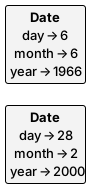
The grammar that uses it has userOperations = user.Date in its system properties, and starts from a graph of two Date-typed nodes with day, month and year attributes — the kind of structure one would have to use without user types:
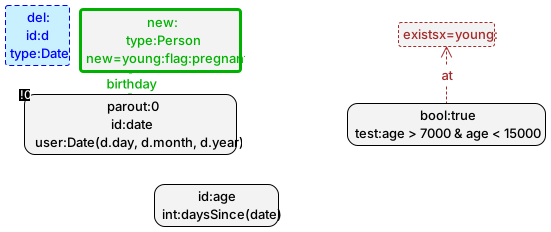
The rule create turns such a node into a Person whose birthday is a Date value, constructed from the node’s attributes. Moreover, the created Person is pregnant on the condition that they are young enough, which is expressed by the optional existential level young (see Nested rules): the level matches if the number of days since the birthday lies between 7000 and 15000. Because daysSince is indeterminate it should not be called on the young level itself, so the rule computes it on the top level, into the variable age, and tests age on the nested level. The test is carried by a bool:true node connected to the quantifier by an at-edge: such a constant node matches exactly once, so it serves as a neutral anchor for a condition that involves no graph node of its own.
| Edit view | Display view |
|---|---|
 |
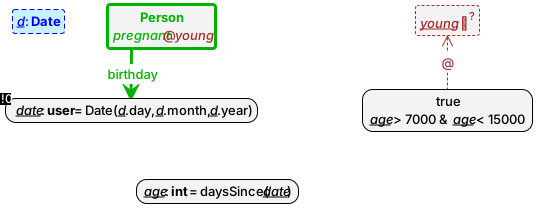 |
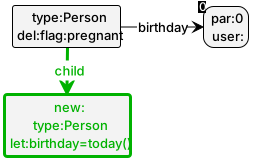
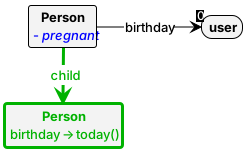
The Date value is also declared as an output parameter of the rule (parout:0), so that it appears in the transition label and can be bound to a control variable. The rule birth lets a pregnant person give birth: the new Person is their child, with today() as their birthday; the parameter here is the birthday of the parent.
| Edit view | Display view |
|---|---|
 |
 |
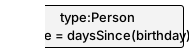
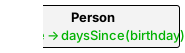
Finally, the rule age shows an instance operation applied to an attribute value, to store a person’s age in days:
| Edit view | Display view |
|---|---|
 |
 |
The grammar is driven by a control program that uses a variable of sort user to pass the date from one rule to the other:
alap {
  user person := create();
  try { birth(person); }
}
Exploring this grammar from the start graph above yields transitions labelled create(Date(6,6,1966)), create(Date(28,2,2000)) and birth(Date(28,2,2000)) — the Date values appearing as transition arguments — in the possible orders. Whether birth is applicable at all depends on the day of the exploration, since only a person between roughly 19 and 41 years old is created pregnant; and the final graph contains a person born today:
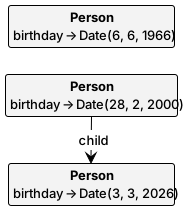
(This final graph was obtained on 3 March 2026; an exploration on another day gives another birthday, and since today() is indeterminate, that is exactly what the state space records.)
Limitations
The current implementation has the following restrictions:
- User-defined types and operations are only supported in the
defaultalgebra (see Algebras). - User types must be Java
records, and their components must be of the four primitive Java types; a user type cannot have a component of another user type, nor of an array or list type. - All user types share the sort
user, so mismatches between user types are only detected at run time, as the error valueNaU. - Operation names must be distinct: there is no overloading, and component names must be distinct across all user types as well, since they become accessor operations.
- Indeterminate operations should not be used on quantified levels of nested rules; release 8.0.0 rejects this.